
Hi! I found 3 bugs in Motivewave version 7.0.14.
First, let me say that this is a great software. Props to the developers of Motivewave.
I’m using the Community Edition of Motivewave, version 7.0.14 on Windows 10.
The first bug appeared just about 2 days ago when version 7.0.14 was released.
This bug affects custom time-frame intervals. 2 months, 3 months, 4 months and 6 months time-frames are affected by this bug and the chart appears distorted. For some reason 1 month and 5 months time-frame intervals aren't affected.
When I load any of the mentioned above custom time-frame intervals, this is what the chart looks like:
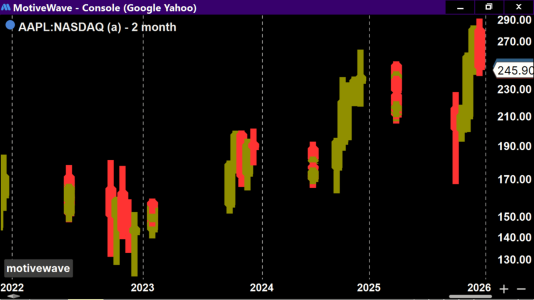
The chart is missing some candles. There are empty spaces where candles should be, red and green candles are on top of each other, all mangled up.
When I switch to a 59 day or 61 day time-frame intervals, the bug disappears and all works fine. Below is a bug free chart of a 59 day interval time-frame chart. It looks fine like this.
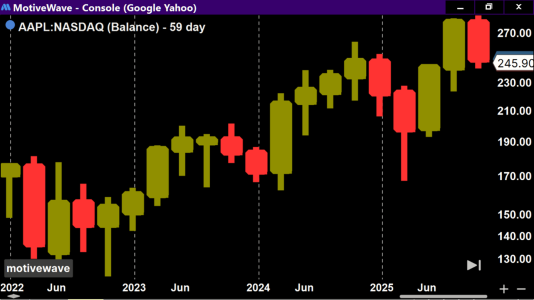
If I go to any other odd interval time-frame, Motivewave displays it just fine. The problem is specific to a 2 months, 3 months, 4 months and 6 months intervals time-frames. Can somone replicate this bug on their computer?
Here’s the second bug. It’s different from the first bug.
The second bug affects the 5 day interval time frame ONLY. 5 day is not to be confused with a 1 week interval time-frame. This bug already happened in the past. It has reappeared again when Motivewave was updated from version 6 to version 7. It’s the same bug that I saw and posted about it on Jan 18, 2023 on this forum. Motivewave had this bug probably since the very beginning. Then it was fixed for a while and now it has reappeared again.
Here’s how to replicate the bug. Switch your time frame interval to a 5 day, (not 1 week) time-frame interval. Draw a DIAGONAL, AT AN ANGLE, trend line or extension line. Start drawing point A of a trend line somewhere in the recent past. Drag point B of the trend line to somewhere in the recent future date. Basically, the middle of the trend line must cross today’s date on the chart. And the trend line must be drawn diagonally, not horizontally. That’s it.
The bug makes the diagonal trend line or extension line flat once it crosses the today’s date on the chart. No matter what angle the original trend line was, it always becomes flat and extended on the right side to infinity. This bug makes it impossible to do any technical analysis on the 5 day interval time-frame chart. Because you can’t project any trend lines past today’s date into the future on a 5 day interval time-frame.
Here’s what the chart looks like before you move the trend line past today’s date.
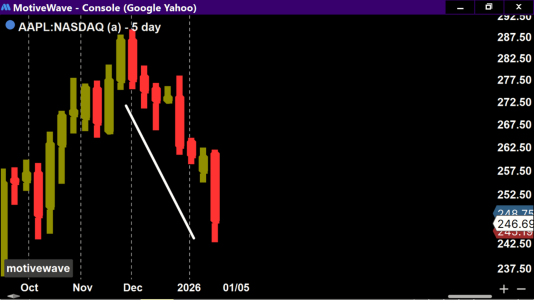
And the next screenshot shows what the same trend line looks like once you move it 4 candles to the right without changing it’s angle.
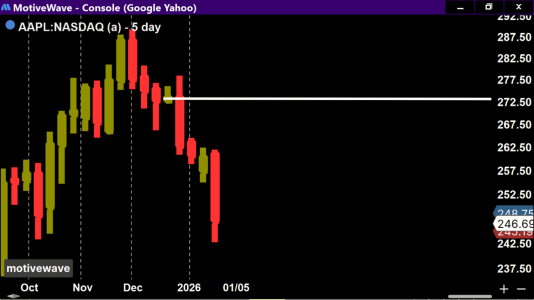
The third bug also appeared recently. I can’t find where the Components panel is anymore.
I used to be able to access it by clicking on the top menu bar and selecting View > Components. Now it’s not there. Also, the keyboard shortcut doesn’t work to open the Components panel. Ctrl + C.
I hope my explanations were clear and that someone can replicate these bugs. I also hope that the developers can look into these issues.
Vitali
First, let me say that this is a great software. Props to the developers of Motivewave.
I’m using the Community Edition of Motivewave, version 7.0.14 on Windows 10.
The first bug appeared just about 2 days ago when version 7.0.14 was released.
This bug affects custom time-frame intervals. 2 months, 3 months, 4 months and 6 months time-frames are affected by this bug and the chart appears distorted. For some reason 1 month and 5 months time-frame intervals aren't affected.
When I load any of the mentioned above custom time-frame intervals, this is what the chart looks like:
The chart is missing some candles. There are empty spaces where candles should be, red and green candles are on top of each other, all mangled up.
When I switch to a 59 day or 61 day time-frame intervals, the bug disappears and all works fine. Below is a bug free chart of a 59 day interval time-frame chart. It looks fine like this.
If I go to any other odd interval time-frame, Motivewave displays it just fine. The problem is specific to a 2 months, 3 months, 4 months and 6 months intervals time-frames. Can somone replicate this bug on their computer?
Here’s the second bug. It’s different from the first bug.
The second bug affects the 5 day interval time frame ONLY. 5 day is not to be confused with a 1 week interval time-frame. This bug already happened in the past. It has reappeared again when Motivewave was updated from version 6 to version 7. It’s the same bug that I saw and posted about it on Jan 18, 2023 on this forum. Motivewave had this bug probably since the very beginning. Then it was fixed for a while and now it has reappeared again.
Here’s how to replicate the bug. Switch your time frame interval to a 5 day, (not 1 week) time-frame interval. Draw a DIAGONAL, AT AN ANGLE, trend line or extension line. Start drawing point A of a trend line somewhere in the recent past. Drag point B of the trend line to somewhere in the recent future date. Basically, the middle of the trend line must cross today’s date on the chart. And the trend line must be drawn diagonally, not horizontally. That’s it.
The bug makes the diagonal trend line or extension line flat once it crosses the today’s date on the chart. No matter what angle the original trend line was, it always becomes flat and extended on the right side to infinity. This bug makes it impossible to do any technical analysis on the 5 day interval time-frame chart. Because you can’t project any trend lines past today’s date into the future on a 5 day interval time-frame.
Here’s what the chart looks like before you move the trend line past today’s date.
And the next screenshot shows what the same trend line looks like once you move it 4 candles to the right without changing it’s angle.
The third bug also appeared recently. I can’t find where the Components panel is anymore.
I used to be able to access it by clicking on the top menu bar and selecting View > Components. Now it’s not there. Also, the keyboard shortcut doesn’t work to open the Components panel. Ctrl + C.
I hope my explanations were clear and that someone can replicate these bugs. I also hope that the developers can look into these issues.
Vitali
Last edited:

