Multiple Connections on Version 7?

John471

Member
Joined
Jan 5, 2024
Posts
22
Likes
3
Hi,

I am demo'ing the new version 7...specifically because I'm interested in a front end where I can connect my Rithmic Broker account as well as my Rithmic Apex accounts. I'm assuming this would be possible w/ the "Multiple Connections" feature now available w/ Professional or Ultimate.

So I created a workspace using my Rithmic Broker account....looking to add the Apex Rithmic accounts....and there appears to be no Rithmic Apex connection available? I must be missing something because I'm sure Apex is who most users want to connect with using this feature.....am I right? If so...what am I doing wrong here because i can't be the first to run into this.

Thanks in advance for any help.

Cheers,

John
1753636148884.png
 
Hi,

I am demo'ing the new version 7...specifically because I'm interested in a front end where I can connect my Rithmic Broker account as well as my Rithmic Apex accounts. I'm assuming this would be possible w/ the "Multiple Connections" feature now available w/ Professional or Ultimate.

So I created a workspace using my Rithmic Broker account....looking to add the Apex Rithmic accounts....and there appears to be no Rithmic Apex connection available? I must be missing something because I'm sure Apex is who most users want to connect with using this feature.....am I right? If so...what am I doing wrong here because i can't be the first to run into this.

Thanks in advance for any help.

Cheers,

John

View attachment 3019

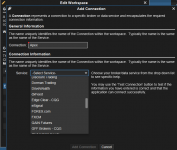
You need to select Rithmic from that drop down menu...

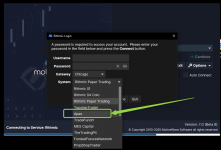
Once you get the workspace setup, there will be a place to select Apex on the login screen.

Capture.PNG

When you login with multiple Rithmic Feeds (2 for example) - You will be prompted with a Rithmic Login screen similar to the image above twice.
 
Last edited:
You need to select Rithmic from that drop down menu...

Once you get the workspace setup, there will be a place to select Apex on the login screen.

View attachment 3020

When you login with multiple Rithmic Feeds (2 for example) - You will be prompted with a Rithmic Login screen similar to the image above twice.
I'm curious how this works. I have accounts through lucid where I enter this info in this pop up but if I have rithmic accounts from another prop firm how would I get a second pop up to load these?
 
I'm curious how this works. I have accounts through lucid where I enter this info in this pop up but if I have rithmic accounts from another prop firm how would I get a second pop up to load these?
If you go into the workspace configuration window and select your current workspace (for example), there will be an option to "Add A Connection". You will need to have at least the Professional version to see that option.

Once you have both of the connections configured, you will be prompted for 2 sets of credentials at the login screen.
 
If you go into the workspace configuration window and select your current workspace (for example), there will be an option to "Add A Connection". You will need to have at least the Professional version to see that option.

Once you have both of the connections configured, you will be prompted for 2 sets of credentials at the login screen.
Ty. Maybe that's the issue. I have the order flow version.
I think you need to be using the View attachment 3292 Connection I think also
Ty.
 
Top