MW7 related chart questions

MrSharky

Well-known member
Joined
Jul 21, 2022
Posts
241
Likes
111
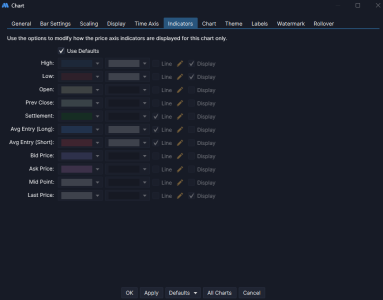
Hi where do you set the default values for this menu. In version 6 you could set them under "indicators" in the Global settings/configure menu. Now I cant find it.
 

Attachments

  • Skärmbild 2025-11-09 235327.png
    Skärmbild 2025-11-09 235327.png
    44.3 KB · Views: 23
You can make your changes and then save as default. Those settings will be applied to a new chart. On existing charts, just apply defaults.
 
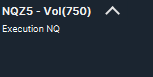
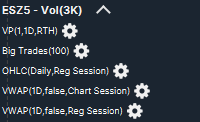
Another question, is it possible and if so how? I dont want the template name as in picture one. I want all the studies to be displayed as in picture 2. I know there is a object viewer but I want to access the short menus (the cogs) and I cant do that in the object viewer.

 

Attachments

  • Skärmbild 2025-11-10 175647.png
    Skärmbild 2025-11-10 175647.png
    2.2 KB · Views: 15
  • Skärmbild 2025-11-10 175950.png
    Skärmbild 2025-11-10 175950.png
    7.6 KB · Views: 18
Another question, is it possible and if so how? I dont want the template name as in picture one. I want all the studies to be displayed as in picture 2. I know there is a object viewer but I want to access the short menus (the cogs) and I cant do that in the object viewer.
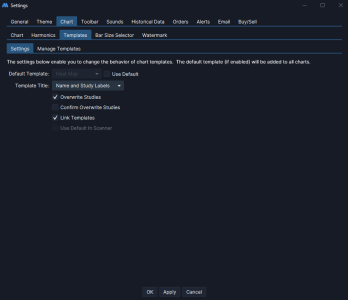
Solved, there is a setting for this in the configuration menu. What is staggering though is that MW support replied with that its not possible.
 
Solved, there is a setting for this in the configuration menu. What is staggering though is that MW support replied with that its not possible.
Sorry, I completely forgot to reply to you earlier. Glad you figured it out.

Yeah, I’ve noticed that MW support sometimes doesn’t quite understand the question or they’re just blissfully unaware. Luckily, the small community we have is usually pretty knowledgeable on things.
 
I have spent literally hours explaining a bug in the Fib extension tool to support. They have been polite, but are incapable of understanding the problem and insist that it is the correct behaviour for the tool and will not fix it. I even made a few videos to explain the problem to them. Here's the last one I made that they still can't understand, so I've given up, and I'm just posting here to warn users to be aware of the bug.

https://e.pcloud.link/publink/show?code=XZ97tIZoqtanAGOGnJebSMpjM1AR5HUg8Ay
Thats very alarming tbh. I have had a couple minor issues and support has been under par. They say they don't get same results and so forth, although I have explained in detail and supplied evidence. Or I have had to find solution on my own because they don’t master their own software. I think it’s important that we as the community share our findings so we can make each others aware of any problems as well as solutions.
 
In the configuration menu under settings.

Also they made something actually really good here. If you change something to the chart after applying the template, the template name which is also listed in the list will disappear from the Title list.
 

Attachments

  • Skärmbild 2025-11-11 223652.png
    Skärmbild 2025-11-11 223652.png
    32.6 KB · Views: 9
Last edited:
Top