Heatmap Issue in MW 7 with DxFeed

screaminbug

Member
Joined
Nov 17, 2025
Posts
12
Likes
1
Hello everyone,

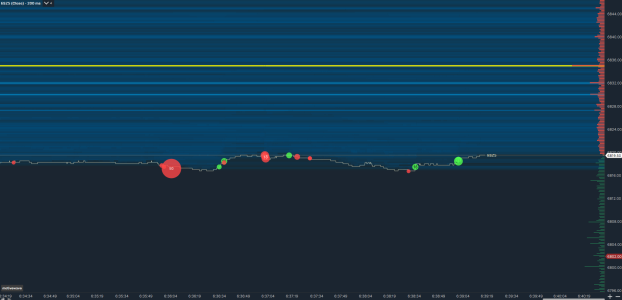
Is it only me, or is Heatmap completely borked in MW 7 (at least with DxFeed). It seems not to match actual orders seen in DOM which is clearly visible if you link the chart with DOM. Even if you don't do that, it can't be that ALL of the orders simultaneously jump few ticks up and down in synchronicity.

This, however, seems to happen only with non-aggregated dxFeed. With Interactive Brokers feed, for example, heatmap seems to be fine for the data it gets (although low quality because of limited depth that IBKR data provides)

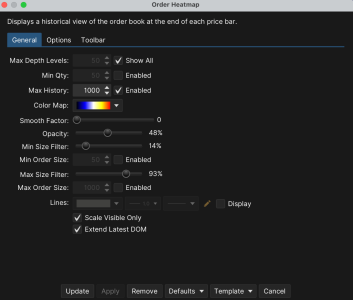
Am I the only one noticing this? I've provided a gif of screen recording showing this, and also the settings which were active when the recording was made (although changing settings in whichever way doesn't do anything to resolve the issue)

MW 6 didn't have those issues.
 

Attachments

  • HeatmapSettings.png
    HeatmapSettings.png
    175 KB · Views: 43
  • HeatmapBug.gif
    HeatmapBug.gif
    1.4 MB · Views: 45
Hi, I have the same issue with AMP Futures and Rithmic. As soon as you set the Chart time new, it corrects the history and starts to be blurry again
 
Hello everyone,

Is it only me, or is Heatmap completely borked in MW 7 (at least with DxFeed). It seems not to match actual orders seen in DOM which is clearly visible if you link the chart with DOM. Even if you don't do that, it can't be that ALL of the orders simultaneously jump few ticks up and down in synchronicity.

This, however, seems to happen only with non-aggregated dxFeed. With Interactive Brokers feed, for example, heatmap seems to be fine for the data it gets (although low quality because of limited depth that IBKR data provides)

Am I the only one noticing this? I've provided a gif of screen recording showing this, and also the settings which were active when the recording was made (although changing settings in whichever way doesn't do anything to resolve the issue)

MW 6 didn't have those issues.
ya the newest version on beta messed it up . heard they are doing a v6 update that im waiting on
 
I've contacted support, and they said that i'm, wait for it .... using the wrong symbol. 🤦‍♂️🤦‍♂️

Seriously, MotiveWave?

This is what they replied:
"Heatmap cannot be used with IB due to feed limitations. The symbol MESZ5 is for IB, and for dxFeed, it should be /MESZ25. Please try it with that symbol instead, and if the issue persists, please provide a copy of your workspace, and I will load it here."

Really, MotiveWave Software. Are you kidding me?

Kind of unprofessional if you ask me.
 
Hello everyone,

Is it only me, or is Heatmap completely borked in MW 7 (at least with DxFeed). It seems not to match actual orders seen in DOM which is clearly visible if you link the chart with DOM. Even if you don't do that, it can't be that ALL of the orders simultaneously jump few ticks up and down in synchronicity.

This, however, seems to happen only with non-aggregated dxFeed. With Interactive Brokers feed, for example, heatmap seems to be fine for the data it gets (although low quality because of limited depth that IBKR data provides)

Am I the only one noticing this? I've provided a gif of screen recording showing this, and also the settings which were active when the recording was made (although changing settings in whichever way doesn't do anything to resolve the issue)

MW 6 didn't have those issues.
so have you managed to fix it?
 
No, not really. MW is now trying to reproduce the issue. Hopefully they do so they can start working on a fix. I do think this is a bug and not much can be done about it by the end user.
 
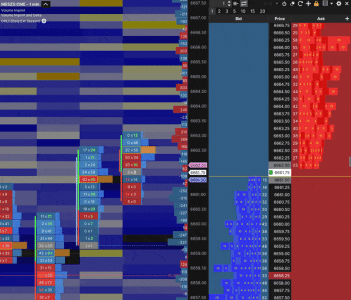
heatmap is unusable for me right now as well. I use CQG thru AMP. It does not line up with the limit orders on the DOM at all, ever since the update on November 13 is when it all of the sudden stopped lining up.
 
Just a follow-up. They managed to reproduce the issue and have classified it as a bug, so hopefully we'll get a fix in one of future updates. I hope soon.
 
It seems like this has been fixed. I'm currently on version 7.0.9 and Heatmap seems to behave correctly now.
 
Thats nice because they seem to have broke it for everyone else. 1 step forward, 2 steps back, I'm running out of patience tbh.
 

Attachments

  • Skärmbild 2025-12-01 123925.png
    Skärmbild 2025-12-01 123925.png
    65.9 KB · Views: 19
Last edited:
I believe that's not the same issue as the one I reported. Mine was that orders/colors were all simultaneously shifting up and down randomly all the time. Now they at least match and don't jump all over the place.

However, I did see that half heatmap missing bug (just like your screenshot) when I popped out the window (it's ok when it's docked in a tab)

So I guess that part still needs work. Contact the support via email, if you haven't already done so. I would guess that they're not reading the forum posts that often. They did solve the issue I reported quite quickly, once they managed to reproduce it.
 
It seems like this has been fixed. I'm currently on version 7.0.9 and Heatmap seems to behave correctly now.
I'm angry with MotiveWave - you can see my blitz posts elsewhere in the forum, but they need to provide a list of bugs fixed in release notes, so we know what we're getting when we upgrade.
 
I have also been having issues with heat map lately, just when I customized gradient shades. now it seems to load when first starting up then things get kind of weird or off after a couple of minutes as if they are no longer scaling by visible bars even when I go back to default coloring. I have rithmic all exchanges
 
They fixed the heatmap for us on PC in version 7.0.10. Now hopefully they did not break something else. :)
 
for the Mac version but I found lately/today was keeping the minimum slider at zero or all the way left as the maximum value slider doesn't seem to do anything no matter what position the minimum is in any longer it's very strange and the look back as well scale visible value there is something off with them still in the dot 10 update at least for Mac
 
it's a shame because I made custom color sets they're like 24 to 40 different shaded colors and now I can't even use default I thought it was something that I did with custom settings it's kind of reassuring to know everyone is having a problem with the heat map it's also a real pain because it's one of my favorite tools
 
Top