
How to Make the Cursor Snap to Bars Instead of Minutes?

Vitalii87

New member
Joined
Feb 21, 2026
Posts
3
Likes
0
Could you please let me know if there is a way to make the cursor move horizontally only by bars?
For example, if the timeframe is 5 minutes, the cursor should move in steps like 10:15 → 10:20 → 10:25, etc.
Currently, it moves minute by minute without snapping to the bars.
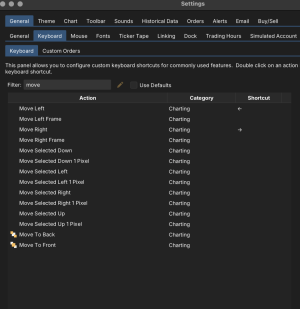
 
That is how my arrow keys work on the Mac Version of MW.
If I push to the right, it goes exactly one bar on the 5 minute candle.
Just use the Keyboard shortcuts to map the arrow keys (or whatever), so it moves the chart by on1772642568636.pnge candle...
See screenshot

1772642568636.png
 
If you want the cursor to snap to the bar and not move across every pixel you need to go to Settings > Chart > Options > you'll want to enable the "Double Crosshair".

I don't know why they named it this but it does exactly what you are looking for across all charts even if the name is slightly counterintuitive.
 
If you want the cursor to snap to the bar and not move across every pixel you need to go to Settings > Chart > Options > you'll want to enable the "Double Crosshair".

I don't know why they named it this but it does exactly what you are looking for across all charts even if the name is slightly counterintuitive.
Thanks, that's exactly what I was looking for.
 
Top